
The most significant cause of VFX budget overruns isn’t creative disagreement; it’s the financial cost of ambiguity in the initial brief.
- Vague instructions like « make it look cool » create uncosted R&D cycles that drain resources.
- Technical decisions made too late in the process, such as changing resolution, can trigger a complete and expensive project reset.
Recommendation: Treat the VFX brief not as a creative document, but as a technical and financial risk management plan. Define non-negotiable technical constraints first to create a safe, predictable framework for creativity.
As a producer, you know the fear. You’ve approved a VFX budget for a complex shot, but a nagging voice worries about it spiraling out of control. Countless projects get derailed by endless revision rounds, miscommunications, and the dreaded « fix it in post » mentality. The common advice is to « be clear » and « provide references, » but this guidance is dangerously superficial. It fails to address the root cause of budget blowouts: a fundamental misunderstanding of the VFX pipeline.
The truth is, visual effects are as much a technical manufacturing process as a creative art form. Every ambiguous request or delayed decision introduces a variable that can have exponential cost implications down the line. A seemingly small change can invalidate weeks of work, forcing artists to re-render, re-simulate, and re-track entire sequences. This isn’t about stifling creativity; it’s about channeling it within a structure that protects the production’s financial health.
This guide abandons the fluffy creative talk. Instead, it reframes the briefing process as a discipline of financial forensics and risk management. We will dissect the common, costly errors producers make and provide a clear, actionable framework to safeguard your budget. By establishing firm technical guardrails and understanding the critical points of no return, you can empower your VFX artist to deliver stunning work on time and, most importantly, on budget.
This article provides a producer’s playbook for collaborating effectively with VFX specialists. We will explore the precise points in the workflow where ambiguity costs the most and how to replace it with profitable precision, from initial briefing to final delivery.
Summary: A Producer’s VFX Briefing Playbook
- Why « Make it Look Cool » is the Most Expensive Brief You Can Give?
- How to Shoot Plates Correctly So the VFX Artist Can Actually Use Them?
- Project Fee or Daily Rate: Which Payment Model Protects the Production?
- The Resolution Mistake That Forces a Total Re-Render of CGI Assets
- How to Give Feedback on Work-in-Progress VFX Without Halting Production?
- The Communication Error That Ruins 40% of Client Validations
- Local Render Farm or Cloud Rendering: Which is Cheaper for One-Off Projects?
- Virtual Production vs Green Screen: Which Offers Better ROI for Sci-Fi Ads?
Why « Make it Look Cool » is the Most Expensive Brief You Can Give?
The phrase « make it look cool » is not a creative instruction; it’s an unwritten blank check. It offloads the responsibility of creative direction onto the artist while simultaneously absolving the production of the need to define success. This creates a cycle of subjective feedback and costly revisions, as the artist is forced to guess what « cool » means to you and your client. In an industry where, according to industry analysis, visual effects consume 20-25% of a total film budget, ambiguity is a luxury no production can afford. This is the ultimate « cost of ambiguity. »
Every hour an artist spends on exploratory work (R&D) that could have been defined upfront is a direct hit to your budget. The solution is not to eliminate creativity but to contain it within Creative Guardrails. Instead of a vague goal, you must translate the desired emotion into technical parameters. What physics should the effect obey or defy? Is the « cool » factor driven by light, texture, motion, or a combination? Providing specific visual references (e.g., « the particle disintegration from ‘Infinity War,’ but with a blue energy signature ») is far more effective than an abstract adjective.
By defining the sandbox, you allow the artist to focus their talent on execution and refinement, rather than on a costly quest to read your mind. This approach turns an open-ended financial risk into a predictable production task.
Case Study: The Sandbox FX Framework
To combat this exact problem, studios like Sandbox FX implement a structured approach to creative exploration. They contractually ringfence the Research & Development phase of a project, allocating a specific, capped portion of the budget for experimentation. This allows for controlled creative discovery within defined boundaries. Once that R&D phase is complete and a direction is approved, the project moves into a fixed-bid execution phase. This hybrid model provides the best of both worlds: creative freedom when it’s needed and budget predictability for the bulk of the work, preventing the « make it cool » brief from derailing the entire project.
How to Shoot Plates Correctly So the VFX Artist Can Actually Use Them?
The single most effective way to protect your VFX budget happens on set, long before post-production begins. A « we’ll fix it in post » attitude during the shoot is a producer’s worst enemy. Every poorly lit green screen, missing tracking marker, or undocumented lens choice creates hours, if not days, of expensive manual labor for the VFX artist. The goal of shooting plates for VFX is not just to capture the performance, but to acquire technical data that makes seamless integration possible.
This means working with the Director of Photography and a VFX Supervisor on set to ensure critical information is gathered. This includes capturing a High Dynamic Range Image (HDRI) of the set using a chrome and grey ball to record the lighting environment. It also involves meticulously photographing lens grids to measure distortion, placing tracking markers for camera matching, and taking detailed reference photos of props and textures. This data allows the artist to perfectly match the CGI elements to the live-action world.
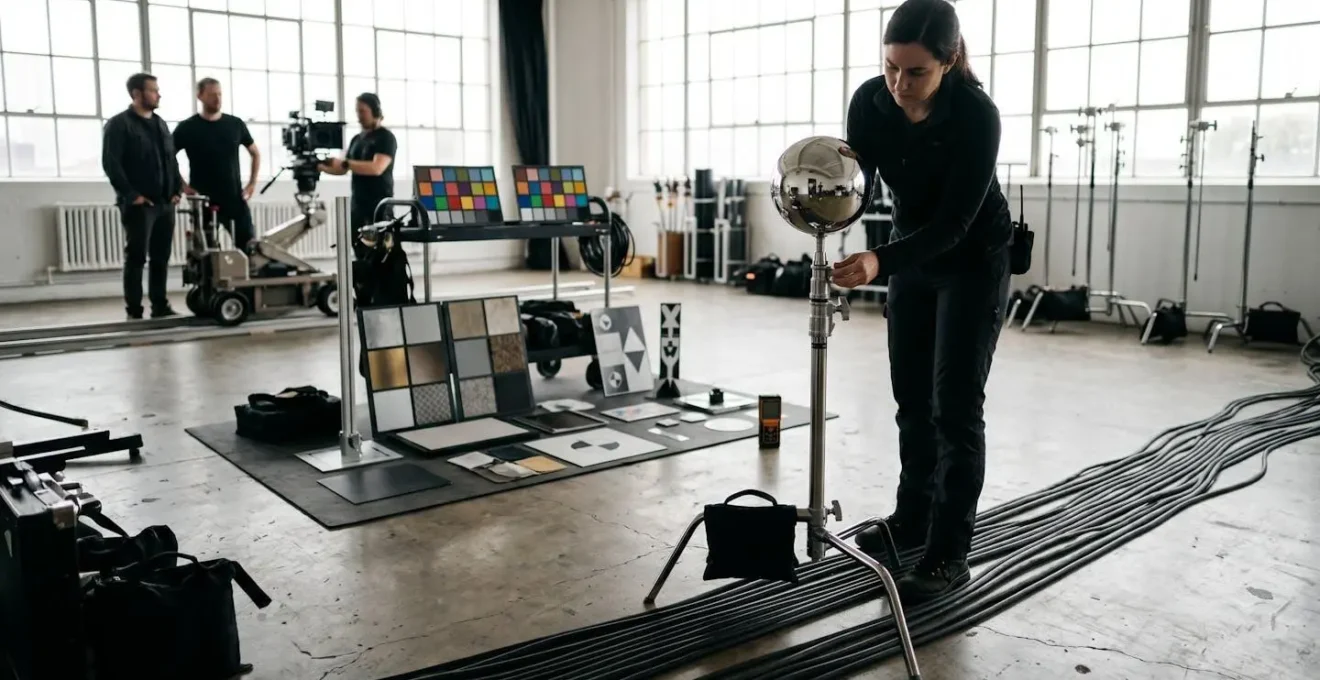
As the image above illustrates, this is a meticulous, scientific process. Investing in a VFX Supervisor for the shoot days might seem like an added upfront cost, but it pays for itself tenfold by eliminating the guesswork and « digital archeology » that plague projects with poorly shot plates. Without this data, the artist is essentially working with one hand tied behind their back, leading to results that feel « off » and require endless tweaks.
The following comparison demonstrates the staggering return on investment of having an expert on set to ensure data is captured correctly the first time. The upfront cost of a supervisor is dwarfed by the potential costs of reshoots and extensive digital fixes.
| Scenario | VFX Supervisor On-Set | No Supervisor (Fix in Post) | Savings |
|---|---|---|---|
| Day Rate/Cost | $1,500/day | $0 upfront | -$1,500 |
| Reshoot Costs | $0 | $25,000 | +$25,000 |
| Post-Production Hours | 100 hours | 300 hours | 200 hours saved |
| Digital Fix Costs | $5,000 | $45,000 | +$40,000 |
| Total Project Cost | $6,500 | $70,000 | +$63,500 saved |
Project Fee or Daily Rate: Which Payment Model Protects the Production?
Choosing the right payment model is a critical piece of financial risk management. There is no single « best » option; the ideal choice depends entirely on the nature of the VFX task. Understanding when to use a fixed project fee versus a daily or hourly rate can mean the difference between a predictable expense and a runaway cost. Context is everything, especially when VFX artist compensation varies dramatically, with rates ranging from $50-100/hour for junior artists to over $1,500/hour for seasoned veterans on complex jobs.
A Fixed Project Fee is best suited for tasks that are clearly defined, measurable, and have a predictable workflow. This includes execution-focused work like:
- Screen replacements
- Wire and rig removal
- Logo or product replacements
For these jobs, the scope is clear, and the artist can accurately estimate the time required. This model protects the production by capping the total cost. However, it’s crucial to include a ‘Defined Revisions Clause’ that specifies how many rounds of changes are included before additional charges apply.
A Daily Rate is the safer option for tasks involving creative exploration and R&D. This includes look development, creature design, or complex simulations (fire, water, magic). In these cases, the final outcome is unknown, and a fixed fee would force the artist to either charge an enormous premium to cover the risk or cut corners. A daily rate allows for the necessary creative flexibility. To protect the budget, you must implement a ‘Budget Cap Alert Clause,’ which contractually requires the artist to notify you when, for example, 75% of the allocated budget has been consumed. This gives you a critical decision point before costs can spiral.
The Resolution Mistake That Forces a Total Re-Render of CGI Assets
Of all the technical specifications in a VFX brief, none is more foundational or more catastrophic if changed mid-project than resolution. A producer asking to « bump up the resolution to 4K » after assets have been built in 2K is not asking for a simple tweak; they are asking to tear down the factory and rebuild it from scratch. This is the ultimate example of a Technical Lock-In—a decision that, once made, becomes prohibitively expensive to reverse.
Why is this so costly? A VFX pipeline is a sequential chain of dependencies. A CGI asset’s texture maps are painted to look good at a specific resolution. The simulation caches for elements like smoke or water are calculated for a specific pixel count. The lighting and render times are optimized for that output size. Changing the resolution invalidates every single one of these steps. As one pipeline expert described it, it’s like changing the gauge of a railway track after the train has already been built; nothing fits anymore.
The only way to prevent this budget-destroying error is to formally sign off on all core technical specifications before any significant asset creation begins. This « Technical Lock-In » agreement should be treated as a binding contract between the production and the VFX artist. It removes ambiguity and establishes the immutable foundation upon which all creative work will be built. Any requested changes to these specs after sign-off must trigger a formal re-bidding process.
Your Technical Lock-In Point Checklist
- Resolution Sign-Off: Finalize all delivery resolutions (e.g., 1920×1080 for broadcast, 4096×2160 for feature) and any intermediary resolutions for review.
- Frame Rate Confirmation: Lock the project frame rate (e.g., 24fps, 29.97fps, 60fps). This impacts all motion and simulation timing.
- Color Space Agreement: Confirm the color pipeline (e.g., ACES, Rec.709, sRGB). A mismatch creates massive color-correction problems.
- Lens Profile Delivery: Provide the VFX artist with the exact lens models used and their distortion profiles from the on-set data capture.
- Final Edit Approval: Do not begin heavy VFX work (like complex tracking or rotoscoping) until the picture edit is 100% locked. Any change to a shot’s length or timing will force a complete restart.
How to Give Feedback on Work-in-Progress VFX Without Halting Production?
Feedback is essential, but unstructured feedback is toxic to a VFX pipeline. A flurry of contradictory notes from multiple stakeholders via email, text, and phone calls can grind production to a halt. The artist is forced to spend more time managing communication and deciphering conflicting instructions than actually creating. An effective feedback loop is not a creative free-for-all; it’s a structured, consolidated, and actionable process designed to maintain pipeline integrity.
First, all feedback must be funneled through a single point of contact—a « Feedback Champion » (often the producer or VFX supervisor). This person’s job is to collect notes from the director, agency, and client, resolve any contradictions, and deliver one consolidated set of instructions to the artist. This prevents the artist from being pulled in multiple directions. Platforms like Frame.io have become industry standard precisely because they solve this problem, creating a single source of truth with frame-accurate, timecoded comments.
Second, the feedback itself must be constructive. A great method for this is the P.P.P. model:
- Praise: Start by identifying what is working. (« The lighting on the character looks fantastic. ») This shows the artist you recognize their effort and skill.
- Problem: Clearly and specifically identify the issue. (« The shadow a-frame 35 doesn’t feel connected to their movement. ») Avoid subjective terms like « it feels weird. »
- Proposal: Offer a constructive, actionable suggestion. (« Could we try making the shadow softer and have it lag a-frame or two behind the action? »)
This model transforms a complaint into a collaborative problem-solving exercise. It respects the artist’s expertise while guiding the work toward the desired outcome, ensuring the project moves forward efficiently with each revision.
The Communication Error That Ruins 40% of Client Validations
The single most destructive communication error in VFX is providing unconsolidated feedback. This occurs when the VFX artist receives separate, often contradictory, notes from the director, the producer, the agency creative, and the end client. The artist is left to navigate a political minefield, trying to decide whose note takes precedence. This chaos not only wastes time and money but also erodes morale and creative momentum. In a rapidly growing industry, with the VFX industry projected to reach $25.0 Billion by 2030, streamlining this process is no longer optional—it’s essential for survival.
The solution is to establish a rigid feedback hierarchy and designate a single « Feedback Champion. » This person, typically the producer, is the sole conduit for instructions to the VFX team. Their role is to gather all notes from all stakeholders, facilitate a meeting to resolve any conflicts, and then compile a single, unified ‘Approved Note’ for the artist. This creates an authoritative « source of truth » and protects the artist from conflicting directives.
Implementing a simple feedback consolidation template can formalize this process and eliminate confusion. This document ensures every piece of feedback is tracked, debated internally, and then translated into a clear, final instruction before it ever reaches the artist. It turns a chaotic conversation into a documented, manageable workflow.
The following table outlines a robust structure for a feedback consolidation template, clarifying who is responsible for each part of the process. Adopting such a system is a non-negotiable step for any serious production.
| Column | Purpose | Filled By |
|---|---|---|
| Timecode | Exact frame reference for the note | All stakeholders |
| Issue | Objective description of the perceived problem | All stakeholders |
| Proposed Solution | A constructive suggestion for a fix | All stakeholders |
| Feedback From | Internal tracking of the note’s source (e.g., Director, Agency) | Feedback Champion |
| Approved Note to Artist | The final, non-contradictory instruction for the artist | Feedback Champion only |
Local Render Farm or Cloud Rendering: Which is Cheaper for One-Off Projects?
Rendering—the process of turning 3D data into final 2D images—is the most computationally intensive part of the VFX pipeline. For a producer, the choice between building a temporary local render farm and using a cloud-based service is a major budgetary decision. For one-off commercial projects, the answer is almost always cloud rendering, especially once you conduct a true « Total Cost of Ownership » analysis.
A local render farm seems appealing because you aren’t paying a per-hour fee to an external service. However, this ignores significant hidden costs:
- Hardware Costs: The expense of purchasing or renting multiple high-end machines.
- Technician Salary: You need a specialist to set up, manage, and tear down the farm, often costing thousands per day.
- Physical Overheads: Costs for electricity, cooling, and the physical space to house the machines.
- Risk of Downtime: If a machine fails, your render stops. With a cloud farm, another node simply takes over.
Cloud rendering services convert all these variable capital expenses into a single, predictable operational expense (OpEx). You only pay for the processing power you use. While the hourly rate might seem high, it provides virtually unlimited scalability, allowing you to hit tight deadlines by throwing thousands of cores at a render for a few hours—a feat impossible with a local setup.
The crossover point is surprisingly low. In fact, industry analysis suggests that projects requiring less than 500 core-hours of rendering are almost always more cost-effective on a local machine. For anything beyond that minimal threshold, the economics of the cloud become overwhelmingly favorable for a short-term project. For most commercial work, which often involves complex CGI and tight turnarounds, the cloud offers a cheaper, faster, and less risky solution.
Key Takeaways
- Vague creative briefs are financial liabilities. Define success with technical parameters, not just adjectives.
- On-set data acquisition (HDRI, lens grids, tracking markers) is the single best investment to reduce post-production costs.
- Lock down core technical specs (resolution, frame rate, color space) in a formal agreement before asset creation begins to prevent catastrophic rebuilds.
Virtual Production vs Green Screen: Which Offers Better ROI for Sci-Fi Ads?
The choice between traditional green screen and modern Virtual Production (VP) using LED volumes is one of the most significant strategic decisions a producer can make, especially for sci-fi commercials rich with reflective surfaces and complex environments. While green screen has a lower initial setup cost, Virtual Production often delivers a substantially higher Return on Investment (ROI) by front-loading the creative decisions and drastically reducing post-production time.
With a green screen, actors perform in a void, and the entire world is built months later in post. This creates challenges for performance, lighting, and especially for capturing realistic reflections on helmets, visors, or metallic costumes. These reflections must be painstakingly animated and composited by hand, a time-consuming and expensive process. In contrast, Virtual Production displays the final CGI environment on a massive LED wall behind the actors. This means that photorealistic lighting and reflections are captured in-camera, in real-time. What you see on the monitor on set is 90% of the way to the final shot.
This « shoot the final » approach has a compound effect on ROI. It not only eliminates weeks or months of compositing work but also empowers the entire crew. The director can frame shots with confidence, the DP can light the scene based on the actual background, and the actors can deliver more authentic performances by reacting to the world around them.
Case Study: The Istanbul Financial Center Commercial
A prime example of VP’s impact is the commercial for the Istanbul Financial Center. MGX Studios utilized a disguise xR workflow with Unreal Engine to create a futuristic city environment on their LED stage. This allowed them to capture complex, dynamic reflections on the characters’ glass-like suits directly in-camera. Furthermore, they could change the time of day or the entire cityscape in real-time with the press of a button, allowing for incredible creative flexibility on set. This approach eliminated the need for a lengthy and expensive post-production compositing phase, demonstrating a clear ROI by collapsing the production timeline.
By shifting your mindset from creative director to risk manager, you can transform the VFX process from a source of financial anxiety into a predictable and powerful storytelling tool. Start implementing this structured, technically-minded approach on your next project to protect your budget, empower your artist, and deliver exceptional results.